Replying in the Inbox
Replying in the Inbox
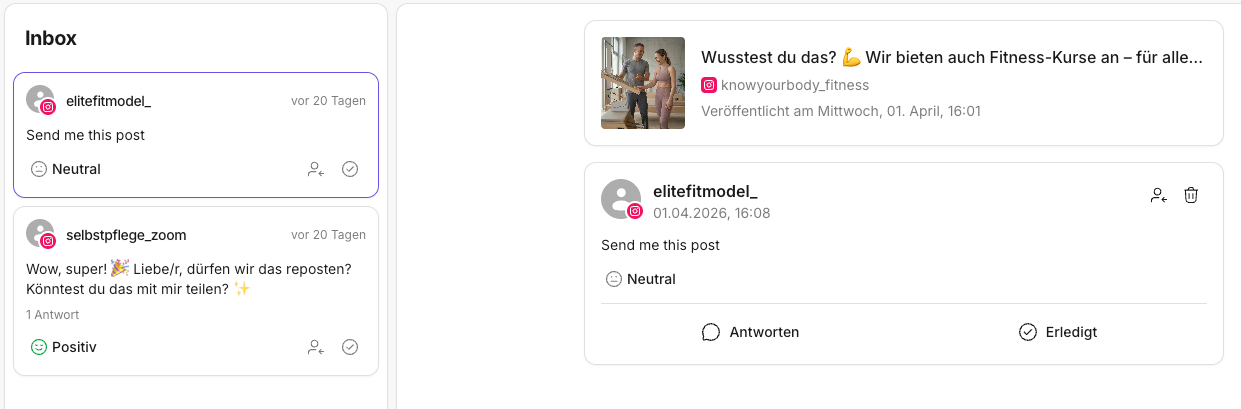
With the Inbox, you reply to comments and messages (DMs) right where they arrive. You no longer have to jump between apps — the post, the conversation history, and the reply area are all in one place.
That saves time and prevents typical mistakes, such as replying without context or duplicate replies within the team.
If you'd like to get to know the Inbox as a whole first, start with the Introduction to the KNOWYOURCHAT Inbox.
1) Before replying: quickly check the context
Before you write, briefly scan:
- the post preview at the top (what was the post about?)
- the thread history (has someone already replied?)
If you're unsure what each area is for, read Understanding the Inbox elements first.
2) Writing a reply (step by step)
- Open the thread in the list on the left.
- Click Reply in the detail view.
- Write your reply.
- Send the reply.
- Mark the thread as Done once everything is truly resolved.
3) A consistent tone across the team
Make sure replies consistently match your brand voice.
Practical tips:
- Use a consistent form of address across the team (informal/formal).
- Use recurring phrasing (or saved replies) to shorten response times.
- If a topic is sensitive: better to stay short & factual.
4) When should you assign instead of replying?
If you're not sure or the reply requires a decision, assigning is often better than writing "just anything".
Good cases for assigning:
- support questions that need expertise
- complaints or sensitive topics
- inquiries that concern sales/management
5) When replying isn't possible (platform limits)
Sometimes you can't reply directly from KNOWYOURCHAT. This depends on the platform and the post type.
Typical signs:
- the reply button is missing or disabled
- certain message types can't be replied to
What you can do then:
- check whether you're in the right account/platform
- reply to the thread on the platform itself if needed
- check the platform limitations: Platform limitations
✅ Rule of thumb: Check the context first, then reply. When it gets sensitive: assign instead of guessing.
Related pages
Need personal help? Email us at support@knowyourchat.de