Tone of Voice in the Inbox
🎛️ Tone of voice in the Inbox
The tone of voice helps you keep replies consistent. Especially when several people are replying or several platforms are running in parallel, a clear tone of voice makes your communication feel "all of a piece".
Think of the tone of voice as a guardrail. It doesn't replace good community management, but it makes decisions faster: How empathetically do we respond? How clearly do we draw boundaries? How much do we mirror the other person's mood?
If you first want to get to know the Inbox as a whole, start with the Introduction to the KNOWYOURCHAT Inbox.
Which tones are available?
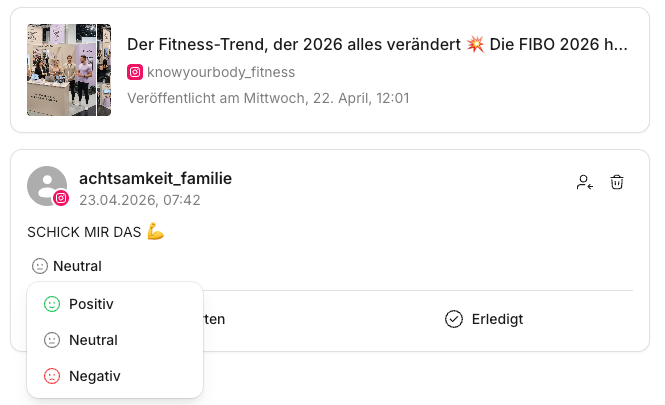
In KNOWYOURCHAT, you can use these tones:
- Neutral
- Positive
- Negative
Important: "Negative" does not mean unfriendly. It means you draw clear boundaries, explain rules, or de-escalate a critical situation.
When do I use which tone?
Here's a simple guide.
- Neutral: Good for standard cases, service questions, and anything that should be resolved factually.
- Positive: Good for praise, thanks, community building, and situations where you want to respond extra friendly and encouraging.
- Negative: Good for complaints, an aggressive tone, rule violations, or when you need to make clear what's possible and what isn't. The goal is always: stay calm, be clear, offer a solution.
Step by step: using the tone of voice
So that tone of voice doesn't stay a "gut feeling", it often helps to read the context and the thread history carefully first. See: Understanding the Inbox elements.
- Open the Inbox.
- Open a thread.
- Take a quick look at context and mood.
- Choose an appropriate tone.
- Write the reply.If you need the complete workflow for this, see: Replying in the Inbox.
- Then mark the thread as Done once everything is resolved. (Details: Marking as done)
Examples
Neutral
"Thanks for your message. I'll look into it and get back to you shortly."
Positive
"Thank you, we're really glad to hear that. If you have any more questions, just let us know anytime."
Negative
"Thank you for your feedback. I understand that this is frustrating. We're looking into it and will get back to you with an update. Please note that for privacy reasons we can't share details publicly."
Best practices
- Agree on a default tone as a team (often neutral) and only deviate deliberately.
- If a thread starts to turn sour, switch to neutral or negative rather than responding with humor.
✅ Quick start: Default = neutral. Positive for community moments. Negative for complaints, boundaries, and de-escalation.
Related pages
Need personal help? Email us at support@knowyourchat.de