Introduction to the KNOWYOURCHAT Inbox
The Inbox is your central place for comments and messages. Instead of switching between platforms, you work through everything in one place – with clear responsibilities and a simple "done" workflow.
The Inbox is especially helpful when several channels are running in parallel and questions or comments come in regularly. Particularly in a team, it ensures you don't reply twice or miss something.
If you're just getting started, First steps in KNOWYOURCHAT is a good entry point (connect channels → set up Inbox/workflow → establish a routine).
Typical situations:
- several platforms running in parallel
- several people on the team replying
- nothing must be left behind (support, community, leads)
What can I do in the Inbox?
Typical tasks in the Smart Inbox:
- read comments/DMs across platforms and see them in context (including the related post)
- reply directly – without switching platforms
- assign threads to team members so it's clear who takes over
- structure threads with labels (e.g. topic, urgency, context)
- keep clean track with status (open/done) and "Done"
How the interface is laid out
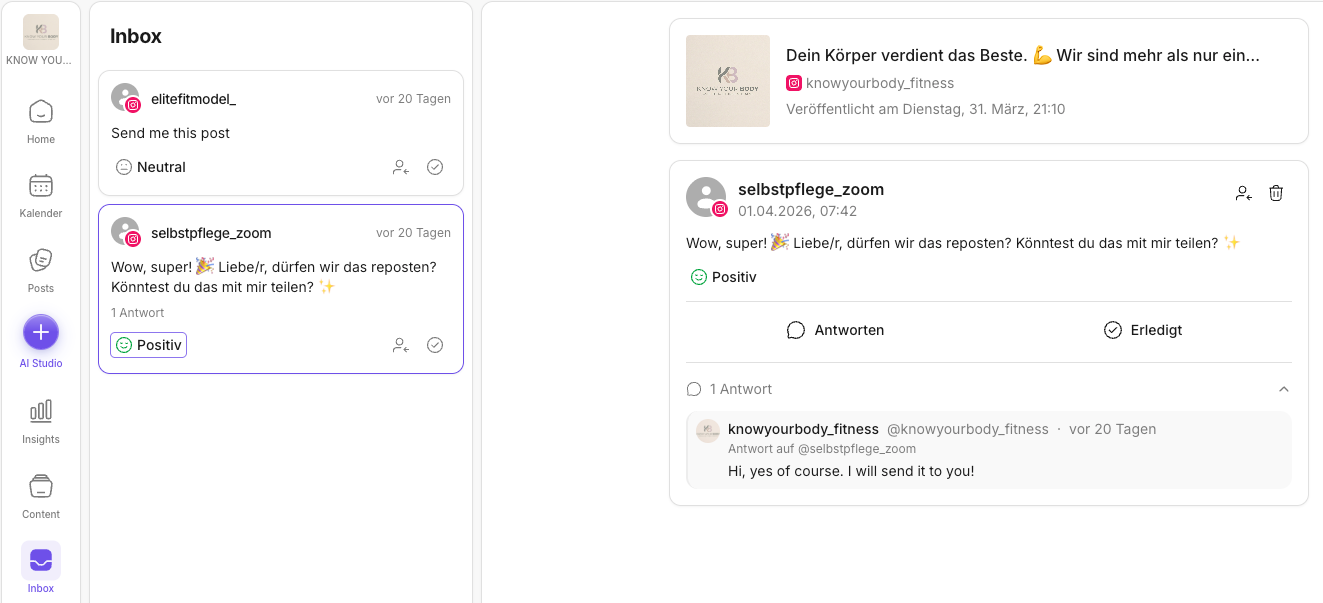
The Inbox is divided into two main areas:
- Left column: Inbox list
- shows all threads as a list (sender, preview, time "X days ago")
- per thread you can see, among other things, the status (e.g. Neutral)
- via icons you can e.g. assign or favorite threads (depending on permissions/setup)
- Right side: detail view
- shows the selected thread
- at the top you see the related post (preview)
- below that you see the conversation history
- key actions: Reply and Done
Typical workflow (in short)
- Select a thread in the list on the left.
- Check the context (post at the top of the detail view).
- Reply or assign it to a person.
- When it's handled, click Done.
✅ In short: The Inbox centralizes your community communication, makes responsibilities clear, and enables fast responses within the team – without constantly jumping between platforms.
Limits (beta / platform APIs)
Which actions are possible depends on the platform. Some moderation actions or special Inbox features may be limited due to APIs.
If you want to check what's possible in the Inbox per platform, use:
- Platform limitations
- Limitations on Instagram
- Limitations on Facebook
- Limitations on TikTok
- Limitations on YouTube
Further reading
Need personal help? Email us at support@knowyourchat.de