How do I filter by status?
✅ How do I filter by status?
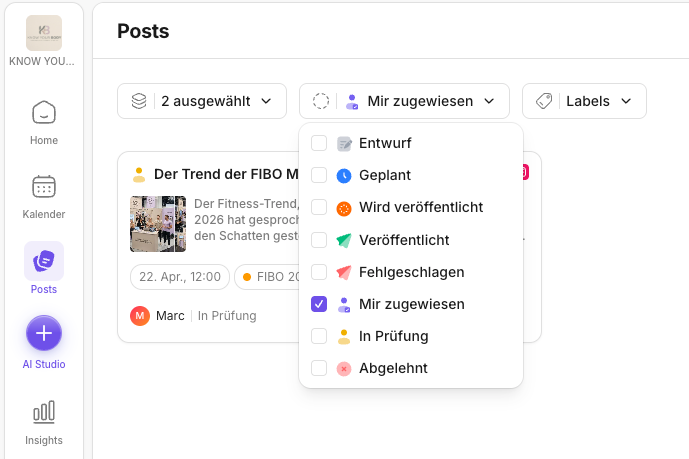
The status filter controls your work mode: you see at a glance what is still a draft, what is waiting for approval, and what is already scheduled or published.
If you first want to understand filtering in general, start with What can I filter by in Posts?.
The status filter is your most important tool for working in a structured way in the workbench. It turns a large collection of posts into a clear to-do list.
Instead of looking at every post individually, you can set up the workbench so that you only ever see what makes sense right now:
- Drafts: What still needs to be written or prepared?
- Waiting for approval: What needs a decision now?
- Approved/Scheduled: What is ready and just needs to be scheduled properly?
This helps especially in teams, because statuses give you a shared language. When everyone works by the same logic, it's immediately clear where a post stands and who's up next.
If you want to read about the approval process in detail, Approval & review in Posts is a good next step.
How to filter by status
- Open Posts.
- Click Status in the filter bar at the top.
- Select the desired status, for example:
- Draft
- Waiting for approval
- Approved
- Scheduled
- Published
Best practice: use statuses as a work-through list
If you prefer working by accounts or labels instead of status, these pages will help you:
- How do I filter by accounts?
- Labels for posts and Labels in Posts
- In the morning: filter Waiting for approval → review and approve
- After that: filter Draft → finish content
- At the end of the day: filter Scheduled → quick final check
💡 Tip: If you see something in the calendar but can't find it in the workbench, it's often due to the status filter.
If posts seem to be "gone", also check the account filter and labels. For typical causes: Troubleshooting the KNOWYOURCHAT Calendar.
Related pages
Need personal help? Email us at support@knowyourchat.de