How do I filter by label?
🏷️ How do I filter by label?
Labels are the fastest way to make recurring formats, campaigns, or priorities visible in the Creator Workbench.
If you want to understand the label system in general, start with Labels for posts.
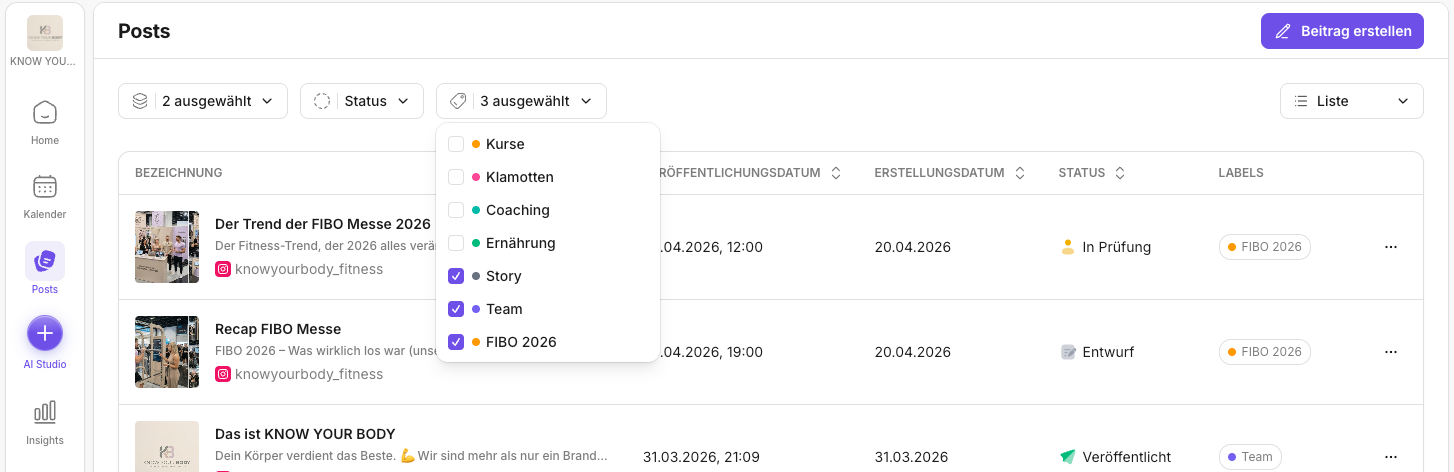
How to filter by label
- Open Posts.
If you want a general overview of filters, see What can I filter by in Posts?.
- Click Labels in the filter bar at the top.
- Select a label, for example
WochendradarorCommunity Wins. - The Workbench now shows only posts with that label.
What labels are especially good for
If you want to deliberately build recurring formats and series, Recurring posts and series is the perfect companion.
- Making series/formats instantly recognizable in the Calendar and the Workbench
- Bundling campaigns (e.g.
Kampagne:Launch) - Marking priorities (e.g.
Prio:Hoch)
A mini rule that really helps teams
Use consistent naming, for example:
Format:…Kampagne:…Prio:…
This way you can filter reliably later.
If you want more detail on naming, do's & don'ts, and typical workflows, continue with Labels in Posts.
Further reading
Need personal help? Email us at support@knowyourchat.de