Inviting Your Team and Assigning Roles
Inviting your team and assigning roles
You can invite team members either directly during onboarding or at any time later via the settings. When inviting, you provide an email address, a name, and a role – the role determines what the person can do in the workspace.
Where can I invite team members?
There are two ways:
Option A: During onboarding
At the end of onboarding, you can add team members directly.
Option B: Later in the settings (workspace)
You can find the invitation at any time under:
- Settings → Workspace → Members
ℹ️ Important: Organization members are not automatically members of a specific workspace.
However, when you invite someone to a workspace, that person is added as an organization member in the process.
How to invite team members (step by step)
- Go to the invitation form (onboarding or settings).
- Enter the email address and name of the person you want to invite.
- Select the appropriate role.
- (Optional) Click Add more to invite several people.
- The invited person then receives an email to sign up for KNOWYOURCHAT.
Roles explained
Roles can vary slightly depending on your plan/setup. The logic is always: the higher the role, the more permissions.
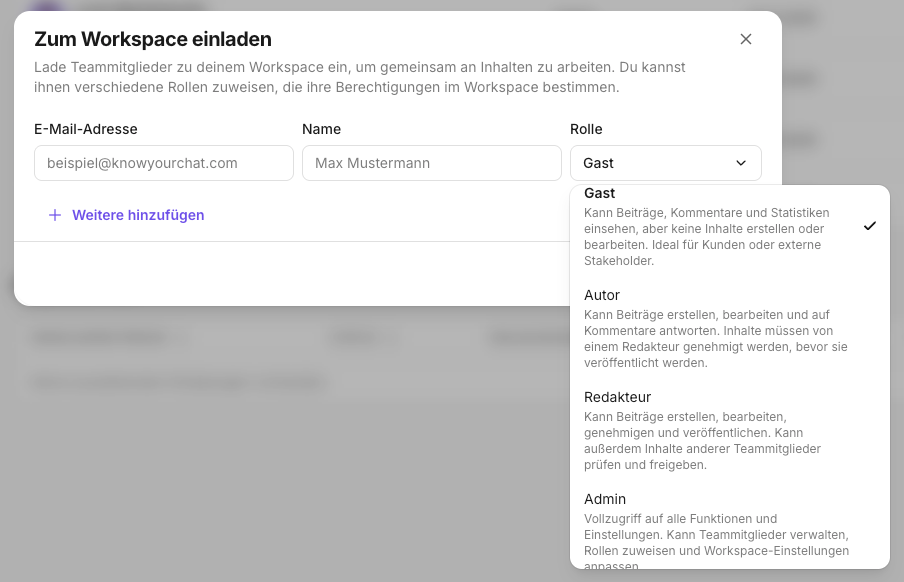
Guest
Can view posts, comments, and statistics, but cannot create or edit content.
Ideal for clients or external stakeholders.
Author
Can create and edit posts and reply to comments.
Content must be approved by an editor before it is published.
Editor
Can create, edit, approve, and publish posts.
Can also review and approve content from other team members.
Admin
Full access to all features and settings.
Can manage team members, assign roles, and adjust workspace settings.
Best practices
- Only grant Admin to people who really should manage settings and members.
- Use Author + Editor if you want a clear review/approval process.
- Use Guest if external people only need visibility.
Related pages
- Onboarding Overview: Get Started in Minutes
- Connecting Social Media Channels
- Setting Goals During Onboarding
- AI in Onboarding: Building Context for the AI Crew
- Defining Brand Voice and Tone During Onboarding
- Setting Up Your Workspace: Basic Setup and Structure
- Creating Your First Post: Manual vs. AI Studio
- Activating the Inbox and Your First Routine
- First Analyses: Using Insights the Right Way
Need personal help? Email us at support@knowyourchat.de