Apps
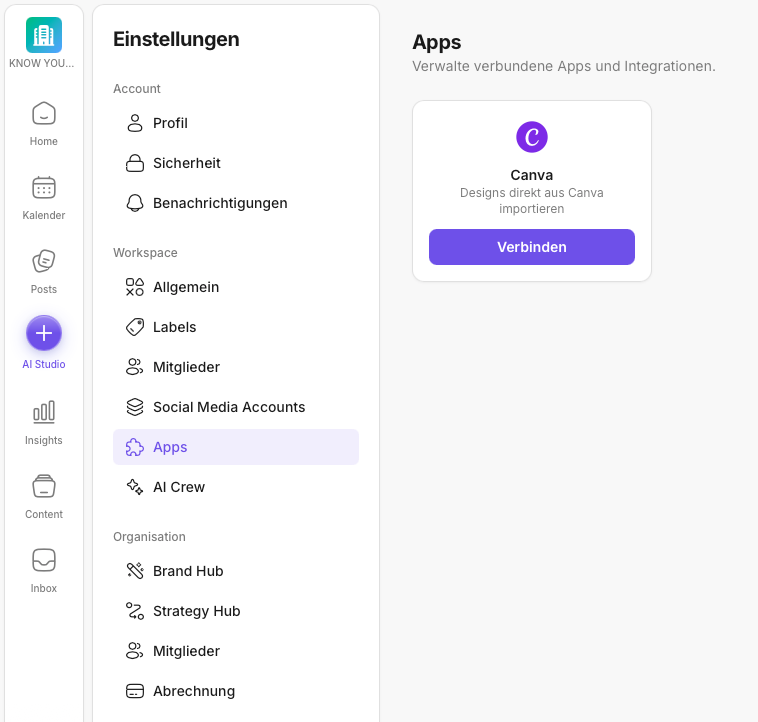
In this area you manage integrations that complement your workflow. In the KNOWYOURCHAT setup, this is specifically about Canva.
If you first want to get an overview of how the settings are structured overall (Workspace, Organization, Account), start here: Settings: Overview.
Canva is especially helpful if you regularly work with templates and design series. Instead of exporting designs and uploading them manually, you can add them to your posts directly in KNOWYOURCHAT.
What is Canva for in KNOWYOURCHAT?
With the Canva integration you can:
- select designs directly from Canva
- use them in posts more quickly
- speed up the creation process in the Creator Workbench
If you're not familiar with the posting process yet, this is the right place to start: Introduction to the Posts area in KNOWYOURCHAT.
Step by step: Connect Canva
- Open Settings.
- Go to Workspace → Apps (integrations).
- Select Canva.
- Click Connect.
- Sign in with the correct Canva account.
- Confirm the permissions.
Best practices
- Connect Canva deliberately per workspace so your team knows which account is being used.
- After connecting, do a quick check to make sure you can select designs in the post creation process.
- If you use multiple workspaces, repeat the connection for each workspace.
If you work in a team, it's also worth clarifying roles and responsibilities (who connects integrations, who uses them day to day): How do I manage members (workspace)?.
If something doesn't work
If Canva doesn't show up or imports don't work:
- Check whether you're in the right workspace.
- Check whether you're signed in with the correct Canva account.
- Disconnect and reconnect Canva.
If it still doesn't work after that, feel free to reach out to us.
Support: support@knowyourchat.de
✅ Quick start: Connect Canva → open a test draft → select your first design.
Further reading (related topics)
- Settings: Overview – where integrations sit in the setup.
- Introduction to the Posts area in KNOWYOURCHAT – using Canva designs in the post creation process.
- Posting – everything about creating, scheduling, and publishing.
- Media – if you want to organize files/assets in KNOWYOURCHAT in general.
- How do I manage my social media accounts? – the distinction: channels (social media accounts) vs. apps (integrations).
Need personal help? Email us at support@knowyourchat.de