How to Call Up the AI Crew
You can call up the AI Crew in KNOWYOURCHAT from anywhere.
🧭 How to call up the AI Crew
You can address the AI Crew directly in the Home area or bring them in on any other page via a quick action. In the AI Studio you choose your crew member and work with them in a focused way.
1) In the Home area (default assistant)
In the Home area, you will find your default crew member front and center at the top. This is the fastest entry point for anything you need "real quick":
- an idea
- a phrasing
- a short structure
- quick help with a decision
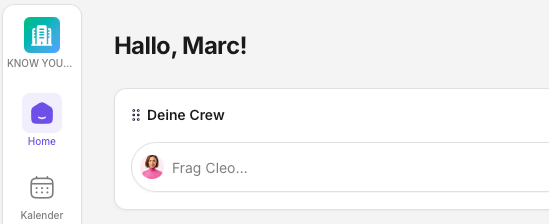
How to start well:
- Say in 1 sentence what you want to achieve.
- Name the platform + target audience.
2) On every page (quick action)
In all areas (e.g. Calendar, Posts, Inbox, Insights) you can open the AI Crew with one small action. Just click the two little stars to the left above the bell. This activates your crew.

This is especially handy because your crew member then automatically picks up the context of the page (e.g. what you are currently working on).
3) In the AI Studio (choose a crew member & work in more depth)
In the AI Studio you work in a focused way with one crew member (currently e.g. Cleo or Nova – with a total of 5 crew members planned).
- Choose the crew member that best fits your task.
- Then work iteratively on your result in the chat.
Further reading: AI Studio: Overview
The best input in 20 seconds
If you provide this information, the first suggestion is usually usable right away.
Important: your crew member usually already knows your goals from onboarding (or from the goals stored later in the settings). So you do not always have to start with the goal.
Ideally provide:
- Platform: Instagram / TikTok / LinkedIn / YouTube / Facebook
- Target audience: Who is the content for?
- Tone: casual / professional / direct
- Context: topic + 2–3 facts
- No-gos: what must not happen under any circumstances
How to get better results (iteration)
The best results often come in 2 short rounds:
- First suggestion → you say "works / doesn't work".
- Fine-tuning → you give 1–2 clear corrections.
Good corrections are, for example:
- "Make it 20% shorter."
- "Fewer emojis, more clarity."
- "Give me 3 variants: neutral, bold, very short."
If the support does not fit
- Give a concrete example of how it should sound.
- Say what you do not want.
- Name 1–2 facts that absolutely have to be included.
Further reading
Need personal help? Email us at support@knowyourchat.de